Blog

  • YouTube Sponsorship for Small Channels : The Ultimate Guide (2026)

    YouTube Sponsorship for Small Channels : The Ultimate Guide (2026)

    You Don’t Need 100K Subscribers to Get Sponsored

    One of the biggest myths in the creator economy is this: you need a massive audience to attract sponsors.

    Wrong.

    After spending over a decade working with content creators from solo gamers with 800 subscribers to mid-size lifestyle channels pushing 50K I’ve seen firsthand that subscriber count is only one piece of the puzzle. Brands today care far more about engagement, audience trust, and niche alignment than raw numbers.

    In fact, I’ve helped channels with under 2,000 subscribers land paid brand deals because they spoke to a hyper-specific audience that a brand desperately wanted to reach.

    This guide is the exact playbook I use with clients. Whether you run a gaming channel, a cooking channel, a study-with-me channel, or something in between youtube sponsorship for small channels with any niche is not only possible, it’s happening every single day.

    Let’s break it all down.

    This article is a part of our complete YouTube Monetization for Beginners in India 2026 step by step guide

    What Is YouTube Sponsorship? (And How It Actually Works)

    A YouTube sponsorship is a paid partnership between a content creator and a brand, where the creator promotes a product or service in their video in exchange for money, free products, or both.

    There are three main types of YouTube sponsorships:

    1. Dedicated Videos The entire video is focused on the sponsor’s product or service. These pay the highest rates but require full transparency with your audience.

    2. Integrated Sponsorships (Mid-Roll or End Mentions) The most common type a 30 to 90-second segment within your regular video promoting the brand. Often called a “sponsor segment” or “ad read.”

    3. Affiliate Sponsorships The brand gives you a custom discount code or link. You earn a commission every time someone buys using your code. Lower upfront pay but can generate passive income over time.

    Pro Insight: For small channels, affiliate and integrated sponsorships are the easiest entry points. Brands take less financial risk, and you build a track record that leads to bigger deals.

    Do Small YouTube Channels Really Get Sponsors? (The Truth)

    Yes and the data backs it up.

    The rise of the micro influencer economy has completely changed how brands allocate their marketing budgets. Studies show that micro-influencers (creators with 1,000–100,000 followers) generate up to 60% more engagement compared to mega influencers, according to influencer marketing research from Influencer Marketing Hub.

    Brands have caught on. Companies like NordVPN, Skillshare, Squarespace, and Audible have sponsored channels with fewer than 5,000 subscribers because those creators had a loyal, trusting audience in a specific niche.

    The three factors brands actually evaluate:

    FactorWhy It Matters
    Engagement RateComments, likes, and shares show audience trust
    Niche RelevanceA fitness brand wants fitness viewers, not random traffic
    Audience DemographicsAge, location, and income matter for brand targeting
    Content ConsistencyRegular upload schedule signals a professional creator

    A channel with 3,000 dedicated fitness subscribers is more valuable to a protein supplement brand than a channel with 50,000 passive viewers who never engage.

    How Much Do Sponsors Pay YouTubers? (Real Numbers)

    This is the question every creator wants answered, so let’s be transparent about it.

    YouTube sponsorship rates are typically calculated using CPM (Cost Per Mille) that’s the cost per 1,000 views or a flat fee per video.

    Industry Standard Sponsorship Rate Benchmarks (2026)

    Channel SizeTypical Sponsored Video Rate
    1,000 – 5,000 subscribers$50 – $300 per video
    5,000 – 20,000 subscribers$200 – $1,000 per video
    20,000 – 100,000 subscribers$500 – $5,000 per video
    100,000 – 500,000 subscribers$2,000 – $15,000 per video
    1M+ subscribers$10,000 – $50,000+ per video

    Important caveats:

    • Niche matters enormously. Finance, SaaS, and business channels typically earn 2–5x more than entertainment or gaming channels per 1,000 views because their audiences have higher purchasing power.
    • Average views per video, not subscriber count, is what most brands actually pay against. A channel with 2,000 subscribers averaging 10,000 views per video can command higher rates than a channel with 20,000 dormant subscribers averaging 500 views.
    • Negotiation is normal. Never accept the first offer from a brand. Counter at 20–30% higher.

    💡 Not sure what to charge? Use this free YouTube Sponsorship Calculator to instantly estimate your sponsorship rate based on your subscriber count, average views, niche, and engagement rate before you send a single pitch.

    Real-World Example: A personal finance channel I consulted for had just 4,200 subscribers but averaged 8,000 views per video. They secured a $750 sponsorship deal with a budgeting app because the audience demographic was exactly what the brand needed.

    Common YouTube Sponsors for Small Channels

    Not all brands require massive audiences. Here are the most common YouTube sponsors actively working with small creators:

    1. Software & SaaS Tools

    • Skillshare: Online learning platform, extremely creator friendly
    • NordVPN / Surfshark: VPN services sponsor across nearly every niche
    • Epidemic Sound: Music licensing for creators
    • TubeBuddy / VidIQ: YouTube growth tools (ideal if your niche is creator education)
    • Canva / Adobe Express: Design tools

    2. Finance & Fintech

    • Robinhood, Webull, Public.com: Great for finance and investing channels
    • Acorns, Stash: Ideal for personal finance or millennial money channels
    • CreditKarma: Works across broad audiences

    3. Health, Fitness & Wellness

    • MyProtein, Optimum Nutrition: Supplement brands for fitness channels
    • Noom, BetterHelp: Mental wellness and lifestyle niches
    • HelloFresh, EveryPlate: Meal kit brands (huge for cooking and lifestyle creators)

    4. E-Commerce & Lifestyle

    • Squarespace / Wix: Website builders sponsor across almost every niche
    • Amazon Associates (Affiliate): Entry-level for all niches
    • Fiverr: Freelancing platform sponsoring business and tech channels

    5. Gaming Specific Sponsors

    • G Fuel, Gamer Supps: Energy drinks for gaming channels
    • Razer, SteelSeries: Hardware brands (usually 10K+ subs required)
    • ExpressVPN: Extremely popular in the gaming space
    • NordPass: Password management, growing in gaming/tech niches
    • GameFuel, Corsair: Peripheral and lifestyle gaming brands

    Tip for Gaming Channels: YouTube sponsorship for small gaming channels is highly achievable with G Fuel and VPN brands specifically they have active micro influencer programs.

    Best Sponsors for Small YouTube Channels (Brand by Brand Breakdown)

    These brands have a documented track record of working with creators well below 100K subscribers. They are listed with estimated rates for small channels, their preferred niches, and minimum requirements.

    1. Audible (Amazon)

    Best for: Education, self-improvement, history, narrative, lifestyle, productivity

    Audible is one of the most small channel friendly sponsors on YouTube. Their affiliate program has essentially no subscriber minimum, and their paid sponsorship program regularly works with channels in the 10K–50K range. The standard deal is a 60 second integration with a custom URL and a free trial offer for viewers.

    DetailInfo
    Minimum subscribers~1,000 (affiliate); ~10K (paid)
    Deal typeAffiliate + flat fee hybrid
    Rate (10K–50K channel)$200 – $800 per integration
    NichesAlmost universal — finance, gaming, education, lifestyle
    Creative freedomHigh — creators have significant flexibility in delivery
    How to applyAudible Creator Program (direct)

    2. Skillshare

    Best for: Creative, design, coding, music, photography, career development

    Skillshare is a performance oriented partner: creators earn a flat fee per qualified sign up using a tracked link, plus sometimes a base fee. They work across a wide range of niches where skill-building is a natural fit.

    DetailInfo
    Minimum subscribersNo hard minimum (affiliate program open to all)
    Deal typePerformance-based (per sign-up) + base fee at higher tiers
    Rate (10K–50K channel)$100 – $600 per video
    CPM equivalent$10 – $20
    NichesCreative, design, tech, photography, productivity
    How to applySkillshare Affiliate Program (self-serve)

    3. Squarespace

    Best for: Business, entrepreneurship, freelancers, tech, creative niches

    Squarespace is one of the most active YouTube sponsors overall, with 1,900+ creator partnerships documented. They work across channel sizes including micro influencers, and they genuinely value creative execution a polished integration that showcases their product well can get you noticed even at lower subscriber counts.

    DetailInfo
    Minimum subscribers~10K for paid deals
    Deal typeFlat fee sponsorship or affiliate ($100–$200/referral)
    Rate (10K–50K channel)$500 – $2,000 per video
    CPM equivalent$15 – $50
    NichesBusiness, tech, design, travel, entrepreneurship
    How to applyPitch via their partnerships email or affiliate sign-up

    4. NordVPN & Surfshark

    Best for: Tech, gaming, privacy, cybersecurity, general entertainment

    NordVPN has been sponsoring YouTubers since 2012. Over 3,000 unique creators have run NordVPN integrations. Their strategy involves continuously rotating through new channels including small ones testing different audiences. They don’t limit themselves to tech channels; their target is audience demographics (25–34-year-olds with disposable income), not content category.

    DetailInfo
    Minimum subscribers~5K–10K for paid deals
    Deal typeFlat fee + affiliate commission stacked
    Rate (10K–50K channel)$300 – $1,200 per integration
    CPM equivalent$10 – $30
    NichesTech, gaming, education, finance, lifestyle, gaming
    How to applyNordVPN Affiliate Program or direct pitch

    5. HelloFresh

    Best for: Food, cooking, lifestyle, family, budget content

    HelloFresh is one of the top three most active YouTube sponsors overall, and a significant share of their deals are with channels under 100K. They are especially strong in food, lifestyle, family, and budget-focused niches, but have expanded into fitness and general lifestyle content.

    DetailInfo
    Minimum subscribers~10K for paid partnerships
    Deal typeFlat fee + affiliate code
    Rate (10K–50K channel)$300 – $1,500 per integration
    CPM equivalent$10 – $25
    NichesCooking, lifestyle, family, budget, health
    How to applyHelloFresh creator partnerships email

    6. BetterHelp

    Best for: Mental health, wellness, lifestyle, education, productivity

    BetterHelp is one of the most cross niche sponsors on YouTube. They appear across wildly different content categories because mental wellness is a universal need. They work with a very wide range of creator sizes.

    DetailInfo
    Minimum subscribers~5K
    Deal typeAffiliate + flat fee
    Rate (10K–50K channel)$200 – $1,000 per video
    CPM equivalent$10 – $22
    NichesAlmost any niche (extremely cross-category)
    How to applyBetterHelp creator program

    7. Brilliant

    Best for: STEM, education, science, math, coding, productivity

    Brilliant is a premium education platform that targets intellectually curious audiences. They command above-average rates in education and STEM niches and are known for working with small-but-engaged channels in these areas.

    DetailInfo
    Minimum subscribers~5K–10K
    Deal typeFlat fee + affiliate
    Rate (10K–50K channel)$300 – $1,200 per video
    CPM equivalent$12 – $25
    NichesSTEM, science, coding, math, education
    How to applyBrilliant creator partnerships page

    8. Ground News

    Best for: News, politics, education, current events, commentary

    Ground News is the fastest-growing YouTube sponsor by volume — logging 1,863 integrations in H1 2025 alone (+202% YoY). Their strategy is deliberately broad: if you have an engaged audience interested in news or current events, they want to work with you regardless of channel size.

    DetailInfo
    Minimum subscribersNo hard minimum reported
    Deal typeFlat fee + affiliate
    Rate (10K–50K channel)$200 – $900 per video
    CPM equivalent$10 – $20
    NichesNews, politics, education, tech, commentary
    How to applyDirect email to their partnerships team

    9. Manscaped

    Best for: Men’s lifestyle, fitness, comedy, gaming, personal care

    Manscaped has built one of the most recognisable YouTube sponsorship playbooks in the men’s lifestyle space. They’re known for giving creators significant creative latitude, which makes their reads feel natural rather than scripted.

    DetailInfo
    Minimum subscribers~10K
    Deal typeFlat fee
    Rate (10K–50K channel)$200 – $800 per video
    CPM equivalent$8 – $18
    NichesMen’s lifestyle, comedy, gaming, fitness
    How to applyTheir brand partnerships email

    10. Amazon Associates / Amazon Music / Twitch

    Best for: Any niche (most universal program)

    Amazon doesn’t run a single YouTube sponsorship program. Instead, several Amazon owned brands sponsor channels independently. Amazon Associates is the most accessible entry point an affiliate program open to any channel size with commission ranging from 1% to 10% on tracked sales.

    DetailInfo
    Minimum subscribersNone (Associates); varies per brand
    Deal typePrimarily affiliate (commission-based)
    Rate (10K–50K channel)Variable ($1–10% commission per sale)
    CPM equivalentVaries widely by product category
    NichesUniversal
    How to applyAmazon Associates Program (self-serve)

    Master Comparison Table: Sponsors for Small YouTube Channels

    BrandMin. SubsPayment TypeRate (10K–50K subs)CPM RangeBest NichesSmall Channel Friendly?
    Audible~1K (affiliate) / ~10K (paid)Flat + affiliate hybrid$200 – $800$10 – $20Education, lifestyle, almost universalExcellent
    SkillshareNone (affiliate)Performance + base fee$100 – $600$10 – $20Creative, design, codingExcellent
    Squarespace~10KFlat fee or affiliate$500 – $2,000$15 – $50Business, tech, entrepreneurshipVery Good
    NordVPN~5K–10KFlat + affiliate stacked$300 – $1,200$10 – $30Tech, gaming, education Very Good
    HelloFresh~10KFlat + affiliate code$300 – $1,500$10 – $25Cooking, lifestyle, family Very Good
    BetterHelp~5KAffiliate + flat fee$200 – $1,000$10 – $22Wellness, lifestyle, education Very Good
    Brilliant~5K–10KFlat + affiliate$300 – $1,200$12 – $25STEM, science, educationGood
    Ground NewsNo minimumFlat + affiliate$200 – $900$10 – $20News, commentary, techExcellent
    Manscaped~10KFlat fee$200 – $800$8 – $18Men’s lifestyle, gaming, comedyGood
    Amazon AssociatesNoneAffiliate only1–10% commissionVariableUniversalExcellent (as entry point)
    YouTube BrandConnect10K+ (YPP required)Marketplace dealsVariesVariesAll eligible nichesEligible from 10K

    How to Get Sponsored by Companies on YouTube: 7 Proven Steps

    Step 1: Build a “Sponsor Ready” Channel First

    Before you approach any brand, do a self audit. Ask yourself:

    • Do I have a clear niche? (Broad channels are harder to pitch)
    • Is my channel art, banner, and About section professional?
    • Do I have a consistent upload schedule (at least 2x per month)?
    • Is my average view-to-subscriber ratio above 10%?
    • Do I have a media kit ready?

    A media kit is your channel’s resume. It should include your niche, average views, audience demographics (screenshot from YouTube Studio), engagement rate, and previous brand collaborations if any.

    Pro Tip: Before building your media kit, run your channel through a free YouTube Sponsorship Calculator to get a realistic estimate of your market rate. Knowing your number going in before a brand quotes you is one of the most powerful negotiation advantages you can have.

    Step 2: Define Your Niche and Audience Avatar

    Sponsors don’t just want viewers they want the right viewers. Before pitching, be able to answer:

    • Who is your audience? (Age, gender, location, interests)
    • What problem does your content solve?
    • What products/services do your viewers buy?

    This specificity is what wins brand deals at small channel sizes.

    Step 3: Find Brands Already Sponsoring Creators in Your Niche

    The fastest path to your first deal is targeting brands already active in your niche. Watch your competitors’ videos and note every sponsor they mention. Those brands have an active budget for creator sponsorships.

    Research tools to find sponsors:

    • Sponsorflyte : Tracks brand sponsorship activity on YouTube
    • Grapevine : Creator-brand marketplace for small channels
    • Aspire (formerly Revfluence) : Influencer marketplace
    • YouTube search : Search “[competitor channel name] sponsor” to spot patterns

    Step 4: Use Sponsorship Platforms Built for Small Creators

    These platforms connect small YouTubers directly with brands looking for micro influencers :

    • Grapevine Village : Accepts channels from 1,000 subscribers
    • Famebit (by YouTube) : Google’s own creator-brand marketplace
    • Channel Pages : Collaboration and brand matching platform
    • Influencity : AI powered influencer marketing platform
    • AspireIQ : Great for lifestyle, beauty, and wellness niches
    • Cooperatize : Content sponsorship marketplace

    Step 5: Write a Cold Pitch Email That Actually Gets Replies

    Most creators send terrible pitch emails. Brands receive dozens weekly. Here’s a structure that converts :

    Subject Line : Partnership Opportunity: [Your Channel Name] x [Brand Name]

    Email Body:

    Hi [Brand Contact Name],

    I’m [Your Name], creator of [Channel Name] a [niche] YouTube channel with [X subscribers] and an average of [X views per video], focused on [describe your audience in one sentence].

    I’ve been using [Brand Product] for [time period] and genuinely believe it aligns with what my audience is actively looking for. My viewers are [brief demographic description] who [describe their problem or interest relevant to the brand].

    I’d love to explore a collaboration whether that’s an integrated mention in an upcoming video or a dedicated review. I’ve attached my media kit with audience analytics.

    Would you be open to a quick 15 minute call this week to explore?

    Best, [Your Name] [Channel Link] | [Email] | [Media Kit Link]

    What makes this email work:

    • Leads with value (your audience), not a request
    • Shows genuine product experience (builds trust)
    • Provides a clear call to action
    • Keeps it short brand managers are busy

    Step 6: Nail the Negotiation

    When a brand responds with an offer, remember these rules:

    1. Never accept the first offer. Counter at 20–30% higher brands expect it.
    2. Package your value. Offer to include social media promotion, pinned comment, or community post as add-ons.
    3. Ask for usage rights clarity. Can they repurpose your content in their ads? If yes, charge a higher rate.
    4. Get everything in writing. Use a simple sponsorship contract specifying deliverables, payment terms, revision rounds, and FTC disclosure requirements.

    Step 7: Disclose Sponsorships Properly (Legal Requirement)

    The FTC (Federal Trade Commission) requires clear disclosure of paid partnerships. Always include:

    • Verbal disclosure at the start of the sponsored segment (“This video is sponsored by…”)
    • On-screen text during the segment
    • Written disclosure in the video description

    Failing to disclose can result in fines and YouTube channel penalties. This is non negotiable.

    YouTube Sponsorship for Small Gaming Channels: A Specific Playbook

    Gaming is one of the most competitive YouTube niches, but also one of the most sponsor friendly. Here’s what works specifically for small gaming channels:

    Start with performance-based deals: Gaming brands often prefer affiliate deals first. Sign up for G Fuel’s affiliate program, NordVPN’s creator program, or GreenManGaming’s affiliate network. Build a track record, then negotiate flat-fee deals.

    Leverage your game niche: A Minecraft channel sponsor is different from a Call of Duty sponsor. Be hyper specific. A Minecraft focused redstone engineer channel is more valuable to a PC peripheral brand than a general gaming channel.

    Target gaming adjacent brands: Don’t just think gaming gear. Gaming audiences also buy energy drinks, VPNs, gaming chairs, PC components, productivity tools, and even online courses.

    Use Discord and Twitch cross promotion: Many gaming sponsors want multi-platform presence. If you have a Discord server or stream occasionally on Twitch, mention it in your pitch. This significantly increases your deal value.

    How to Sponsor a Video on YouTube: What the Process Looks Like

    For clarity, here’s the full workflow once a sponsorship deal is agreed upon:

    1. Receive brief from brand :They’ll provide key messaging, talking points, dos and don’ts
    2. Film your integration : Natural, conversational tone works better than scripted reads
    3. Send preview for approval : Most brands require seeing the sponsored segment before publish
    4. Publish with proper disclosures : Both verbal and written
    5. Share analytics after 7–14 days : Send a performance report (views, clicks on link, CTR). This builds long-term relationships
    6. Invoice and follow up : Most brands pay within 30–60 days

    5 Mistakes Small YouTubers Make When Pursuing Sponsorships

    Mistake #1: Pitching brands without a media kit Your pitch is your first impression. No media kit = no deal.

    Mistake #2: Waiting until they’re “big enough” There’s no magic subscriber threshold. Start pitching at 1,000 subscribers with strong engagement.

    Mistake #3: Only accepting cash deals Product seeding (free products in exchange for honest reviews) builds your portfolio for future paid deals.

    Mistake #4: Ignoring affiliate programs as a starting point Affiliate partnerships are often the bridge to flat-fee brand deals. Take them seriously.

    Mistake #5: Not following up 80% of deals are closed after 2–3 follow-ups. Send one polite follow-up email after 5–7 business days if you don’t hear back.

    Frequently Asked Questions

    How many subscribers do you need to get sponsored on YouTube ?

    There is no official subscriber minimum. Many creators land their first sponsorship between 500–2,000 subscribers by focusing on a highly specific niche and strong engagement rates. Brands care more about audience quality than quantity.

    How much do sponsors pay small YouTubers?

    Small YouTubers (under 10,000 subscribers) typically earn between $50 and $500 per sponsored video, depending on niche, average views, and engagement rate. Finance and business niches command higher rates. For a personalized estimate based on your specific channel stats, try this YouTube Sponsorship Calculator it factors in your niche, views, and engagement to give you a realistic rate range.

    What are the most common YouTube sponsors for small channels?

    The most accessible sponsors for small channels include Skillshare, NordVPN, Squarespace, Epidemic Sound, G Fuel (gaming), HelloFresh (lifestyle/cooking), and affiliate programs like Amazon Associates.

    Can I get a YouTube sponsorship with any niche?

    Yes. Every niche has relevant brands. The key is identifying companies whose target customer matches your audience. Even very niche channels urban gardening, miniature painting, vintage book restoration can attract sponsors selling to those audiences.

    How do I find sponsors for my YouTube channel?

    Use platforms like Grapevine, Famebit, and AspireIQ to get matched with brands. Alternatively, research brands already sponsoring creators in your niche and reach out directly via cold email.

    Final Thoughts : Start Before You Feel Ready

    Getting YouTube sponsorship for small channels is a skill and like every skill, it improves with practice.

    Your first pitch won’t be perfect. Your first deal might be a $75 affiliate arrangement. That’s fine. Every successful creator with brand partnerships today started exactly where you are.

    The path forward is clear:

    1. Build a niche specific, professional channel
    2. Create a compelling media kit
    3. Identify brands already active in your space
    4. Craft personalized pitches
    5. Follow up, negotiate, and deliver great content

    The brands are out there. The budgets are real. The only thing missing is your pitch in their inbox.

  • How to Check If a YouTube Channel Is Monetized

    How to Check If a YouTube Channel Is Monetized

    Have you ever watched a YouTube video and thought “Is this channel actually making money?”

    Maybe you want to check a competitor in your niche. Or you want to see if a creator you like has crossed the monetization mark. Or maybe you just want to check your own channel from the outside.

    Whatever your reason you are in the right place.

    In this guide, I will show you exactly how to check if a YouTube channel is monetized in just a few seconds. I will also explain what monetization actually means, why it matters, and how our free tool makes the whole process super easy.

    No login needed. No complicated steps. Let’s get into it.

    This article is a part of our complete YouTube Monetization for Beginners in India 2026 step by step guide

    What Does “Monetized” Mean on YouTube?

    Before we check anything, let’s quickly understand what monetization actually means.

    When a YouTube channel is monetized, it means the channel has been approved by YouTube to earn money. This happens through something called the YouTube Partner Program (YPP).

    Think of it like this YouTube checks if your channel is big enough and follows all their rules. If it does, YouTube gives you permission to run ads on your videos and earn money from them.

    To join the YouTube Partner Program, a channel needs to meet these basic requirements:

    • At least 1,000 subscribers
    • At least 4,000 watch hours in the last 12 months OR 10 million Shorts views in the last 90 days
    • Follow all of YouTube’s monetization policies
    • Have a Google AdSense account linked

    One thing that confuses a lot of creators here Shorts watch time does not count toward the 4,000 hour requirement. Shorts have a completely separate path. If you post mainly Shorts and want to understand exactly how that affects your monetization eligibility, read our full breakdown on does YouTube Shorts watch time count toward monetization.

    Once approved, a channel can earn money from ads, memberships, Super Thanks, and more.

    Simple enough, right? Now let’s look at why you might want to check this for any channel.

    Why Would You Want to Check If a Channel Is Monetized?

    Good question. Here are the most common reasons people check this:

    • You want to study successful channels — If a channel in your niche is monetized, that means their content strategy is working. You can learn a lot from them.
    • You are a brand looking for creators — Before reaching out to a YouTuber for a collaboration or sponsorship, you want to know if they are serious enough to be in the Partner Program.
    • You want to know how much a channel earns — Not the exact number, but a rough estimate. This helps you understand how profitable a certain niche really is.
    • You want to check your own channel — Sometimes creators just want to see how their channel looks from the outside.

    All of these are totally valid reasons. And checking is easier than you think.

    How to Check If a YouTube Channel Is Monetized with 3 Easy Methods

    There are three ways to do this. I’ll start with the easiest and most accurate one.

    Method 1 : Use the Free Toolbil YouTube Monetization Checker (Best Method)

    The fastest way to check YouTube channel monetization status is to use our free YouTube Monetization Checker.

    You don’t need to create an account. You don’t need to install anything. Just paste a channel URL and you get your answer in seconds.

    Here’s how to do it step by step :

    Step 1 : Open the Toolbil Monetization Checker

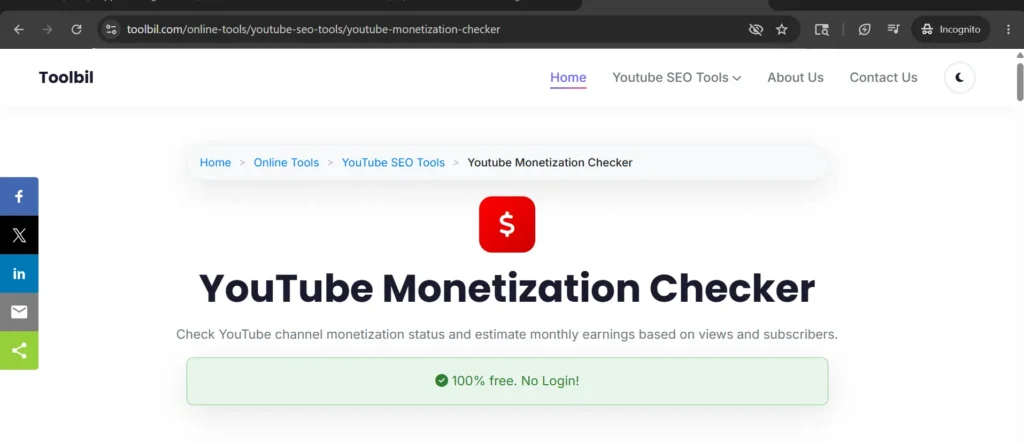
    Go to toolbil.com ->YouTube Monetization Checker. The page will load with a simple input box. That’s it. No signup, no pop ups.

    Toolbil YouTube Monetization Checker tool homepage

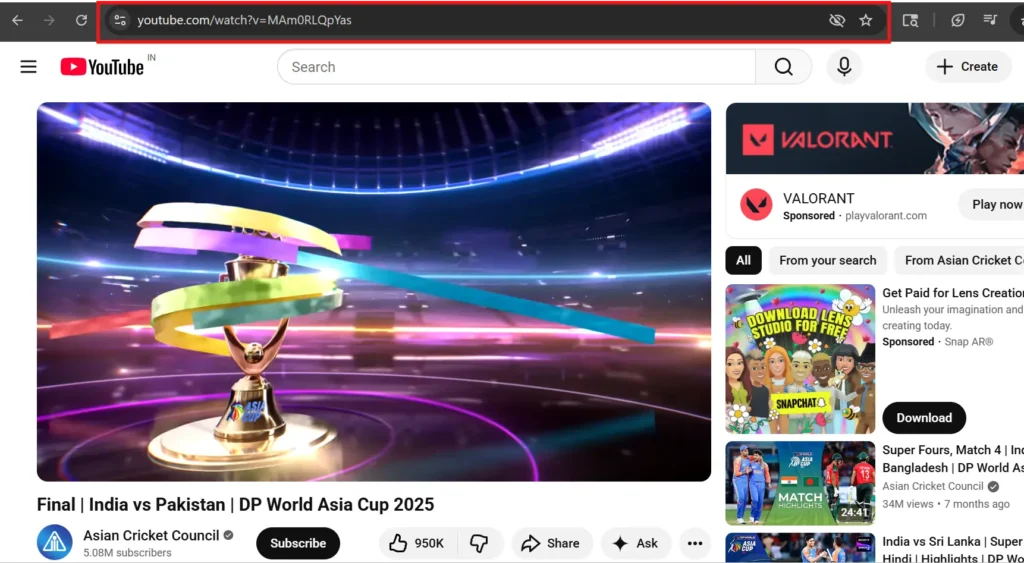
    Step 2 : Copy the YouTube Channel URL

    Open YouTube in another tab. Go to the channel you want to check. Look at the web address bar at the top of your browser that’s the channel URL.

    It will look something like this:

    • https://www.youtube.com/@channelname
    • https://www.youtube.com/channel/UCxxxxxxxx

    Click on that address and copy it (Ctrl+C on Windows, Cmd+C on Mac).

    How to copy a YouTube channel URL from the browser address bar

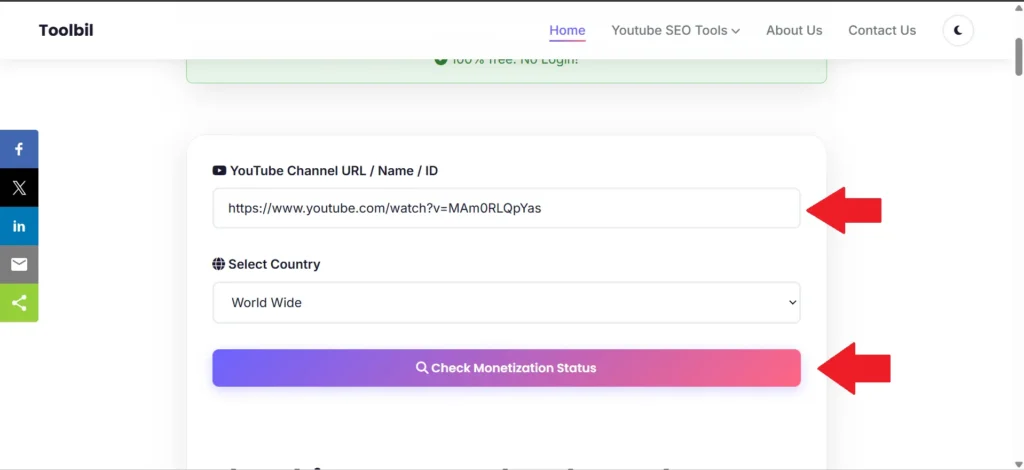
    Step 3 : Paste the URL and Click Check

    Go back to the Toolbil tool. Paste the channel URL into the input box (Ctrl+V or Cmd+V). Then click the Check Monetization Status button.

    Paste the YouTube channel URL into the Toolbil monetization checker
    Paste the channel URL into the box and hit Check it only takes a second.

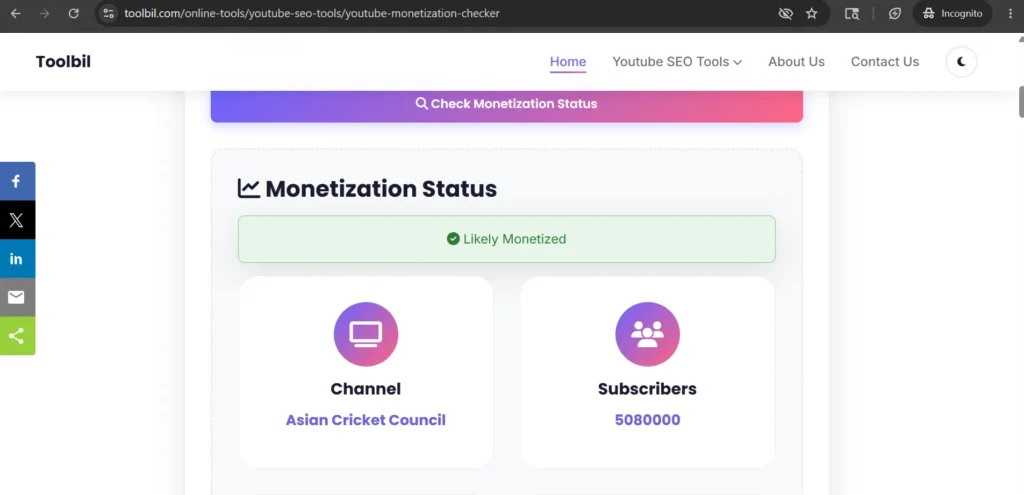
    Step 4 : See Monetization Results

    In just a few seconds, you will see a full report on that channel. You’ll know right away if the channel is monetized or not.

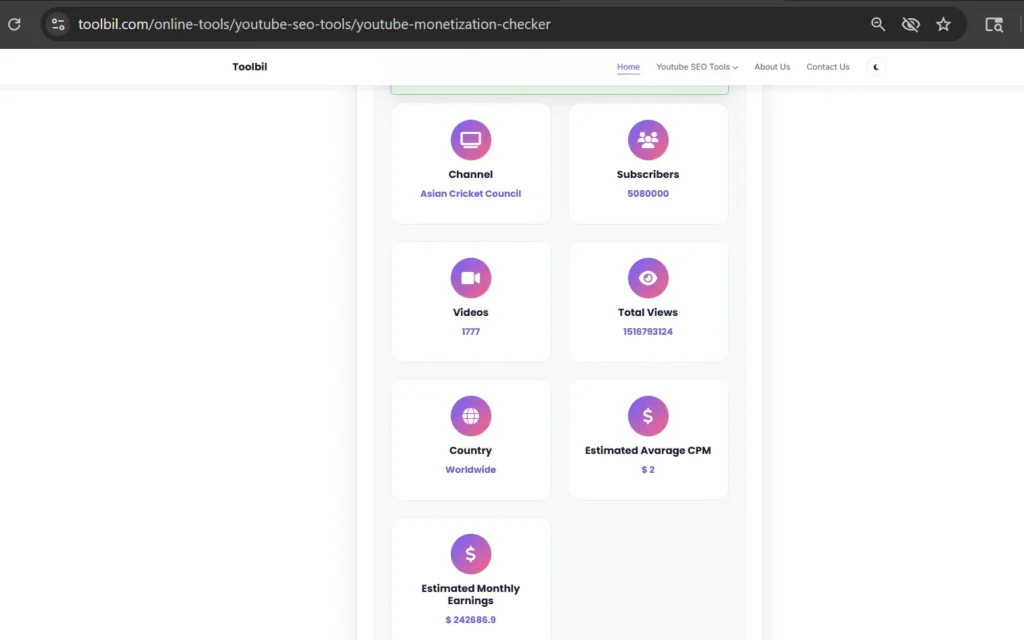
    YouTube Monetization Checker results showing monetization status and estimated earnings
    Your results show up instantly monetization status, estimated earnings, subscriber count, and more.

    💡 Helpful tip: Once you know a channel is monetized, you can dig even deeper. Use our YouTube Video Data Extractor to see the exact tags and keywords that channel uses on their best performing videos.

    Method 2 : Look for Clues Directly on YouTube

    You can also check without any tool just by looking at the channel on YouTube. These are not 100% confirmed results, but they are strong clues.

    Here’s what to look for:

    • Ads playing on their videos : If you see an ad before or during a video, that channel is almost certainly monetized. Non monetized channels can’t run ads.
    • A “Join” button next to Subscribe :This is the Channel Memberships button. Only channels in the YouTube Partner Program can have this.
    • A “Thanks” button below videos : This is the Super Thanks feature. Again, only YPP members can use it.
    • A merchandise shelf below videos : If you see products listed below a video, the channel is monetized.

    The downside of this method? Some creators turn ads off on certain videos. Or they might have memberships disabled. So you could look at a monetized channel and see none of these signs.

    That’s why the Toolbil YouTube Monetization Checker is more reliable it checks the actual channel data, not just what you can see on screen.

    Method 3 : Check Your Own Channel via YouTube Studio

    This method only works for your own channel. You can’t use it to check someone else’s.

    Here’s how:

    1. Go to studio.youtube.com and log in.
    2. In the left menu, click on Earn (sometimes called Monetization).
    3. You’ll see your current status either “Not eligible yet”, “In review”, or “Likely Monetized”.

    That’s it for your own channel. But if you want to check any other channel, you’ll need Method 1.

    What Information Does the Toolbil Tool Show You?

    Most free tools just tell you “yes” or “no.” Our YouTube Monetization Checker gives you a lot more than that.

    Here’s what you get in your results:

    • Monetization Status : A clear “Monetized” or “Not Monetized” result. No guessing.
    • Estimated Monthly Earnings : A realistic earnings range based on the channel’s niche, view count, and average CPM rates. Not the exact amount, but a solid ballpark figure.
    • Subscriber Count : How many subscribers the channel currently has.
    • Total Videos Published : How many videos they have uploaded in total.
    • Channel Creation Date : When the channel was first created. This helps you understand how long it took them to grow.

    And remember : all of this is completely free. No account, no credit card, no tricks.

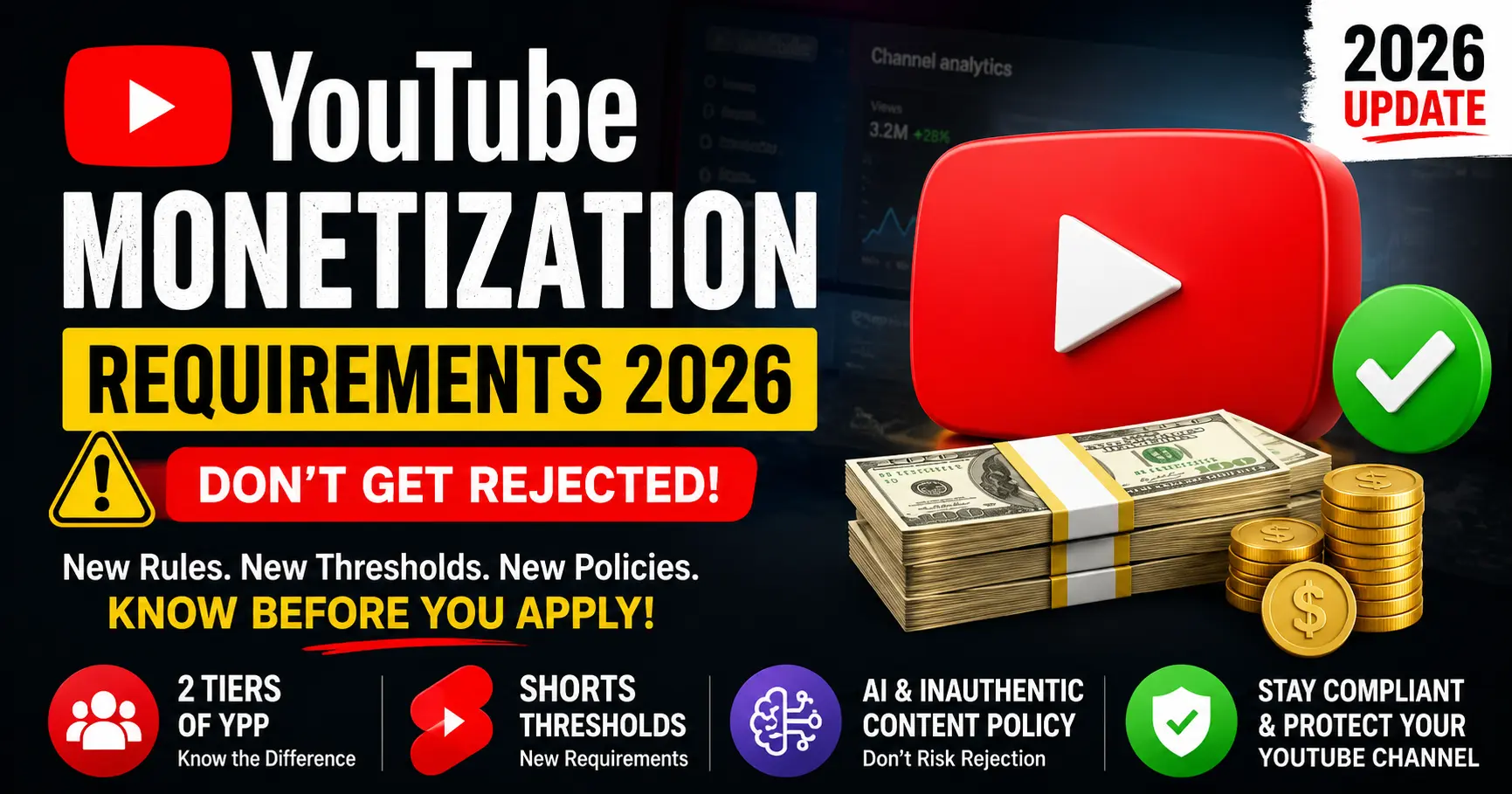
    YouTube Partner Program Requirements in 2025

    Want to get your own channel monetized? Here’s exactly what you need.

    YouTube actually has two levels of the Partner Program now. Here’s how they compare :

    RequirementStandard YPP (full)Expanded YPP (fan funding only)
    Subscribers needed1,000+500+
    Watch hours (12 months)4,000 hours3,000 hours
    Shorts views (90 days)10 million3 million
    Can run ads on videos✅ Yes❌ No
    Channel memberships✅ Yes✅ Yes
    Super Thanks✅ Yes✅ Yes

    The expanded YPP tier is newer. It lets smaller channels earn through memberships and fan donations before they hit the 1,000 subscriber mark. But to run actual ads on your videos, you still need the full Standard YPP.

    You can check the official YouTube Partner Program requirements page for the most up to date information.

    How to Use This to Grow Your Own Channel

    Knowing that a channel is monetized is useful. But knowing what to do with that information is even better.

    Here’s how to turn it into action:

    • Find the keywords they rank for : Once you’ve identified a monetized channel in your niche, use our free YouTube Tag Generator to discover the kind of keywords that work in that niche.
    • Study their thumbnails : Monetized channels have usually figured out what kind of thumbnails get clicks. You can download any thumbnail for free using our YouTube Thumbnail Downloader and use it as inspiration for your own.
    • Find out what brands would pay : Wonder what a monetized creator in your niche earns from sponsorships? Use our YouTube Sponsorship Calculator to estimate brand deal rates based on subscribers and views.

    Frequently Asked Questions

    Can I check someone else’s YouTube channel monetization status?

    Yes, absolutely. The Toolbil YouTube Monetization Checker works for any public YouTube channel not just your own. Just paste their channel URL and you’ll get the result right away.

    Is this tool really free? Is there a catch?

    It’s completely free. No account needed, no credit card, no hidden charges. You can check as many channels as you want without any limits.

    How accurate are the results?

    The monetization status check is very accurate for most channels. It looks at real channel signals to determine YPP status. The estimated earnings are a realistic range not an exact figure, since actual earnings depend on the viewer’s country, niche CPM rates, and how many ads the viewer watches.

    What if a channel shows “not monetized” but I can clearly see ads on their videos?

    This can happen in rare cases usually when a channel was very recently approved and the data hasn’t updated yet. If you see ads playing on a video, that channel is monetized. The tool result will catch up within a day or two.

    Will the channel owner know I checked their monetization status?

    No. Checking a channel on Toolbil is completely private. The channel owner gets zero notification. You can check any channel without them ever finding out.

    Can I check a YouTube Shorts channel too?

    Yes. Channels that mainly post YouTube Shorts can also be in the Partner Program. The tool checks the overall channel status, so it works for Shorts channels, long form video channels, and mixed channels too.

    How much does a small monetized YouTube channel actually earn?

    It varies a lot by niche. A small channel with around 1,000 to 5,000 subscribers might earn anywhere from $5 to $50 per month from ads. Finance and tech channels earn much more per view compared to entertainment or vlog channels. The more views you get, the more you earn it’s that simple.

    Ready to Check a YouTube Channel?

    Now you know exactly how to check if a YouTube channel is monetized and you have three different ways to do it.

    The fastest and most detailed way is always the Toolbil YouTube Monetization Checker. It’s free, instant, and gives you way more information than just a yes or no answer.

    Go ahead and try it right now paste any YouTube channel URL and see what you get. And while you’re at it, explore all our free YouTube SEO tools to help you grow your channel faster.